
Professional Bulk Photo Scanning Solutions
Smart Photo Auto-Rotate
Automatic photo rotation for your entire folder of photos
Smart Photo Auto-Rotate automatically checks the photos in a folder, determines the correct orientation, and rotates them for you. Simply choose your photo folder, click Start, and let the program do the repetitive work.
It’s especially useful for collections of scanned family photos, where images may have been scanned in different directions and traditional auto-rotate tools often can’t determine which way the photo should actually face.

Powerful Features. Real Benefits.
AUTOMATIC ORIENTATION DETECTION
Intelligent image analysis finds the correct orientation — upright, sideways, or upside down.
PROCESS AN ENTIRE FOLDER
Handle an entire folder of photos in a single run.
SAFE & SMART
When unsure, the program won’t guess. Uncertain photos are left unchanged for your review.
NO QUALITY LOSS
JPEG photos are rotated with no quality loss. Your original image quality is preserved.
RUNS LOCALLY
Your photos stay on your computer. Nothing is uploaded or sent to any online service.
FREE TO TRY
Process up to 100 photos free and see the results for yourself before deciding whether to unlock larger folders.
See It in Action
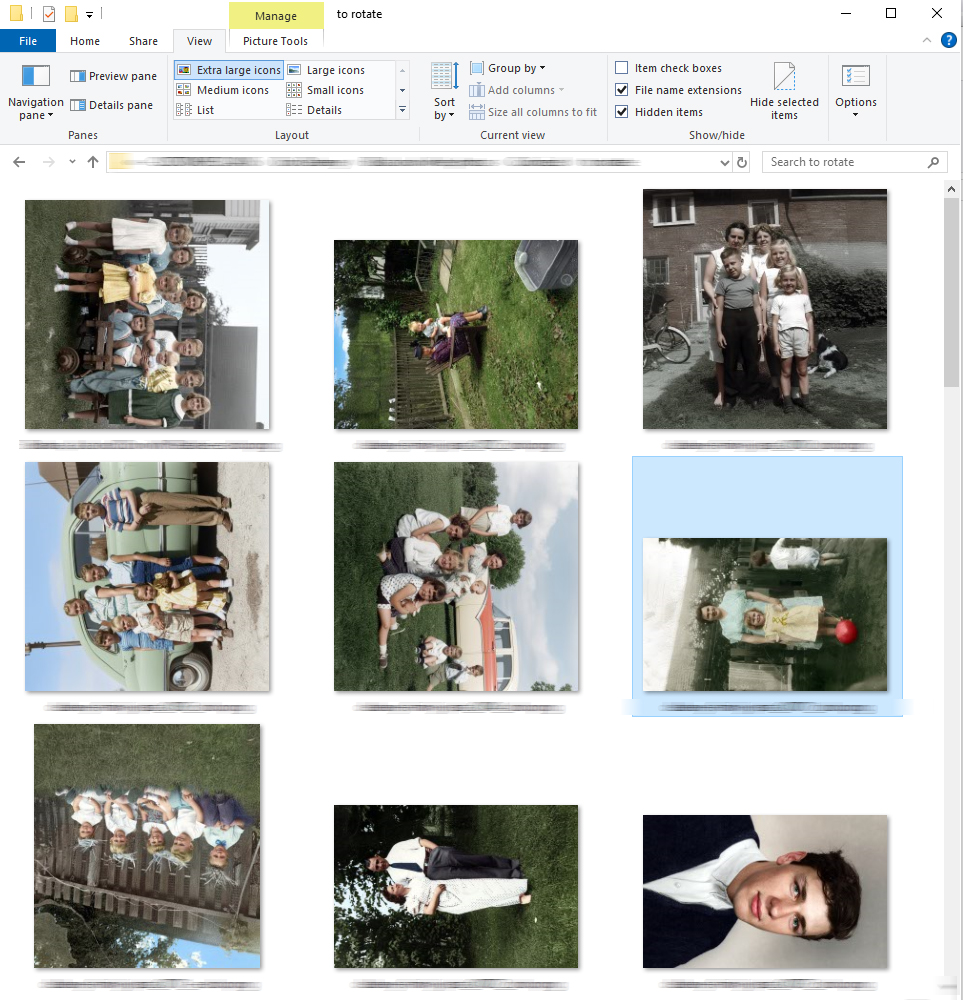
Before
Mixed orientations in the folder
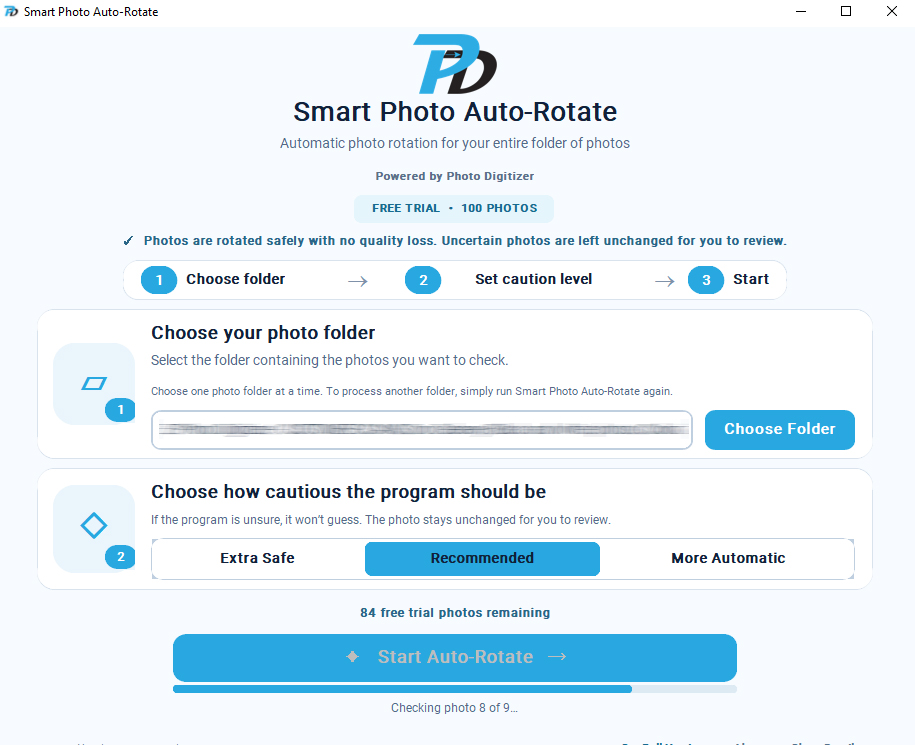
Processing
Smart Photo Auto-Rotate at work
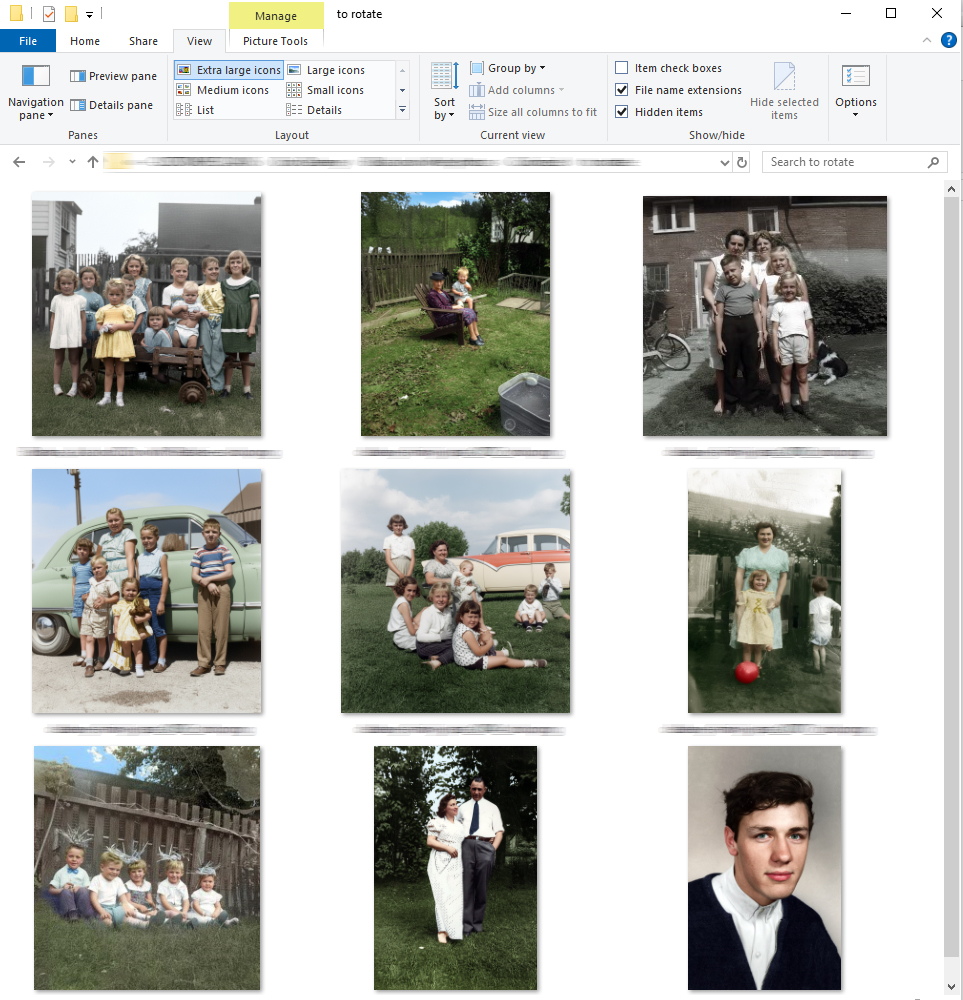
After
All photos oriented correctly
Ready to Save Hours of Work?
Download Smart Photo Auto-Rotate and let it handle the repetitive work for you.
Who Is it For?
Families
Perfect for organizing scanned family photos, inherited photo collections, and years of memories that may have been scanned in different directions.
Photo Scanning Businesses
Save time on large scanning projects by automatically correcting photo orientation instead of rotating images one at a time.
Genealogists & Historians
Keep family-history and research collections easier to browse by correcting sideways and upside-down photos automatically.
Archivists
Prepare digital photo collections with more consistent orientation while leaving uncertain images unchanged for review.
Anyone with Large Photo Collections
Ideal for anyone with hundreds or thousands of photos that need to be cleaned up and organized without hours of manual rotation.
Why I Created this Tool
While digitizing thousands of client photos, I spent far too much time rotating images one by one. Existing tools either relied on EXIF data (which scans don’t have) or weren’t accurate enough for real-world photo collections. Want to understand why scanned photos often end up sideways or upside down? Read our guide on how to automatically rotate scanned photos in bulk on Windows.
I built Smart Photo Auto-Rotate to be simple, reliable, and safe—so you can get back to enjoying your photos instead of fixing them.

A Tool I Couldn't Find Anywhere Else
I couldn’t find a simple Windows tool designed specifically to automatically correct the orientation of an entire folder of scanned photos—one that’s accurate, safe, and leaves uncertain photos alone. So I built one.

How It Works
1. Choose Your Folder
Select the folder with the photos you want to fix.
2. Select Caution Level
Choose how carefully the program should rotate.
3. Start Auto-Rotate
The program scans and rotates photos automatically.
4. Review (if needed)
Check any photos the program was unsure about.
Privacy and Photo Quality
- Photos stay on your computer.
- No photos are uploaded to Photo Digitizer.
- JPEG photos are rotated with no quality loss.
- Uncertain photos are left unchanged for you to review.

Ready to Rotate More Than 100 Photos?
Try Smart Photo Auto-Rotate free on up to 100 photos.
If it saves you time and you want to process larger collections, upgrade to the full version.
Free Trial
$0
- Process up to 100 photos
- Automatic orientation detection
- JPEG rotation with no quality loss
- Photos stay on your computer
- Uncertain photos are left unchanged for review
Full Version
$9.95
- Process unlimited photos
- No 100-photo trial limit
- All Smart Photo Auto-Rotate features
- No subscription
- Use it whenever you need it
- Instant download after purchase
Best for larger photo collections.
One-time purchase. No subscription. Your photos remain on your computer.
Already tried the free version?
The full version lets you continue processing larger photo collections without the 100-photo limit.

Frequently Asked Questions
No. Photo analysis happens directly on your computer. Your photos are not uploaded to Photo Digitizer or sent to an online service.
JPEG photos are rotated with no quality loss. The program changes the orientation without unnecessarily recompressing the image.
No. The installer includes everything Smart Photo Auto-Rotate needs to run. Simply download the installer, run it, and follow the on-screen instructions.
The free trial allows Smart Photo Auto-Rotate to process up to 100 photos on your computer. You can use those 100 photos in one folder or across several folders. Once the trial limit has been reached, you can purchase the full version to continue processing additional photos.
It won’t guess. If Smart Photo Auto-Rotate is not confident enough about a photo, that image is left unchanged so you can review it yourself.
No. Smart Photo Auto-Rotate processes one selected folder at a time. To process another folder, simply run the program again and choose that folder.
Smart Photo Auto-Rotate saves the corrected orientation directly to the photos in the folder you select. Because of that, it’s a good idea to test the program on a copy of your photos first. JPEG rotation is performed with no quality loss, but the orientation change itself is saved to the file.
The program supports JPG, JPEG, PNG, TIFF, TIF and BMP image files.
You can try Smart Photo Auto-Rotate free on up to 100 photos. If you like the results and want to process larger collections, you can purchase the full version.
Smart Photo Auto-Rotate is a new Windows application, and the current direct-download version is not digitally signed. Because of that, Windows SmartScreen or some antivirus programs may show an “unknown publisher,” “unrecognized app,” or reputation warning. These warnings can appear simply because the program is new and has not yet built a download reputation.
If you downloaded Smart Photo Auto-Rotate directly from PhotoDigitizer.net and Windows displays “Windows protected your PC,” click More info, confirm that you are running Smart Photo Auto-Rotate, and then click Run anyway.
You should not disable your antivirus software. If your antivirus reports a specific malware infection rather than a general reputation or unknown-publisher warning, stop and contact Photo Digitizer before running the file.

About Photo Digitizer
Smart Photo Auto-Rotate was created by Photo Digitizer, a professional photo scanning and digitization service.
I work with large collections of printed photos, slides, negatives, documents, and family archives, so I know how much time can be lost fixing small problems one image at a time.
Smart Photo Auto-Rotate grew out of that real-world work — I wanted a faster way to correct mixed photo orientations without sacrificing image quality or sending customers’ photos to an online service.
If you have boxes of family photos, albums, slides, negatives, or documents that you’d rather have professionally digitized, Photo Digitizer can help.